Enterprise Cloud Migration Playbook: AWS vs Azure Strategy, Architecture Patterns, and Cost Optimization Based on 50+ SMB Migrations
Written by : Team Accveil

Cloud adoption has shifted from being a digital transformation initiative to a core infrastructure decision for modern enterprises. Yet, despite widespread adoption, nearly 84% of enterprise cloud migrations experience delays, cost overruns, or architecture rework due to poor planning and unclear migration strategy frameworks (Flexera 2025 Cloud Report)..
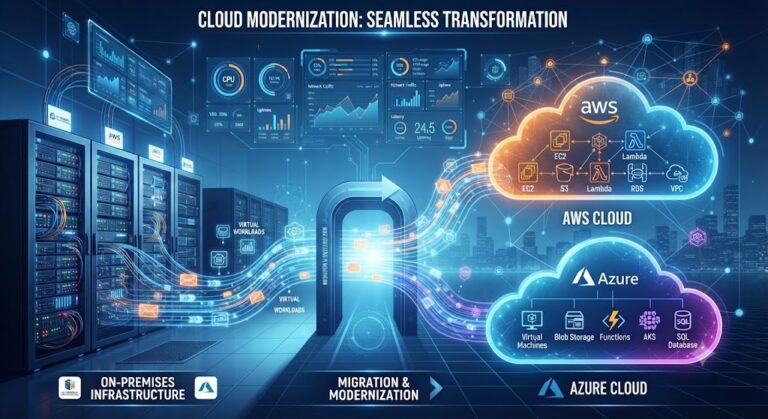
Cloud migration is no longer about ‘moving to cloud’, it is about choosing the right cloud migration strategy, aligning workloads with architecture patterns, and controlling long-term cost efficiency across AWS and Azure ecosystems. Understanding why your business needs a cloud migration strategy before execution begins is what separates migrations that deliver on their promise from those that result in cost overruns and rework. This makes structured cloud migration planning essential before any execution begins.
This playbook breaks down AWS vs Azure decision-making, architecture patterns, migration roadmap design, and cost optimisation frameworks based on insights from 50+ SMB cloud migration assessments and deployments.
Cloud Migration Planning & Cloud Readiness Assessment
Cloud migration planning starts with evaluating whether an organization is technically and operationally ready to move. A cloud readiness assessment identifies system dependencies, application behavior, infrastructure constraints, and compliance requirements before any migration begins. The key planning components are as follows:
1. Application inventory mapping: Creating a complete catalogue of all applications, databases, APIs, and middleware layers, including undocumented or shadow IT systems. This step also maps upstream and downstream dependencies to ensure no hidden service is left unaccounted for during migration.
2. Infrastructure profiling: Analysing current compute consumption patterns, storage growth rates, and network traffic flows to understand workload intensity. This helps determine whether workloads should be rehosted, optimised, or re-architected in cloud environments.
3. Security & compliance validation: Reviewing encryption standards, IAM roles, access controls, logging mechanisms, and regulatory requirements to ensure alignment with cloud security frameworks and industry compliance mandates before migration begins.
4. Workload classification: Segmenting applications into migration categories such as rehost, replatform, refactor, retain, or retire. This classification directly influences architecture decisions, migration sequencing, and cost forecasting accuracy.
5. Performance baseline capture: Recording pre-migration benchmarks such as CPU utilisation, memory usage, latency, throughput, and error rates. These baselines are critical for validating post-migration performance improvements or identifying regressions.
Across SMB migration projects, strong readiness assessments reduce post-migration rework by 30–40%, mainly by preventing late-stage redesigns and unexpected downtime corrections.
A well-structured planning phase also reduces dependency-related failures, which are one of the most common reasons for migration delays in legacy-heavy environments.
AWS vs Azure: Strategy Selection and Workload Alignment
Choosing between AWS and Azure is a core decision in any cloud migration strategy, but it is rarely about features alone. It depends on workload type, internal skills, and enterprise ecosystem alignment.
AWS and Azure dominate enterprise cloud adoption, together accounting for more than 50%+ of global cloud infrastructure usage. The choice between them is not about superiority but workload fit.
|
Factor
|
AWS
|
Azure
|
|---|---|---|
The SMB migration patterns observed include:
- Nearly 73% of SMB migrations evolve into hybrid or multi-cloud setups during phased execution
- AWS is often selected for new-age application development and scalable digital platforms
- Azure is preferred when organizations rely on Microsoft ecosystems like Active Directory, Office 365, or Windows Server
- Workload splitting between AWS and Azure is common for cost balancing and performance optimization
A key takeaway is platform selection is less about cloud capability and more about existing enterprise ecosystem alignment and workload behavior.
AWS Mumbai Region vs Azure Central India: What Indian Enterprises Need to Know
For Indian businesses, the cloud platform decision is not just a technical question, it is shaped by data residency obligations, regional latency performance, and compliance with Indian financial regulators. This is a gap most cloud playbooks overlook, and it directly affects architecture decisions for businesses operating under RBI, SEBI, or IRDAI oversight.
Data Localisation and Regulatory Compliance
The Reserve Bank of India (RBI) mandates that payment system data be stored exclusively within India, with no mirroring abroad. SEBI similarly requires that trading and investor data remain within Indian jurisdiction. Both AWS Mumbai (ap-south-1) and Azure Central India (Pune) maintain Indian data centres that satisfy these localisation requirements, but the implementation approach differs.
AWS offers explicit data residency controls through its Region selection and Service Control Policies, making it straightforward to enforce that no data leaves ap-south-1. Azure provides equivalent controls through Azure Policy and data residency commitments under its enterprise agreements, with additional support for compliance workloads through Azure Government-equivalent configurations available in the India region.
For businesses under RBI or SEBI regulation, both platforms are viable but the compliance validation process is more documented and auditor-familiar on Azure due to its longer enterprise compliance track record in India.
Pricing Comparison: AWS Mumbai vs Azure Central India
Pricing varies by workload type, but the table below reflects typical compute costs for standard SMB workloads as of 2026:
| Resource | AWS Mumbai (ap-south-1) | Azure Central India (Pune) |
|---|---|---|
| General-purpose compute (4 vCPU / 16 GB RAM) | Approx. ₹12,000–₹15,000/month (on-demand) | Approx. ₹11,500–₹14,500/month (pay-as-you-go) |
| Reserved instance savings (1-year) | 30–40% reduction on on-demand rates | 25–35% reduction via Azure Reserved VM Instances |
| Managed database (comparable tier) | RDS MySQL: Approx. ₹9,000–₹13,000/month | Azure Database for MySQL: Approx. ₹8,500–₹12,500/month |
| Egress to India (per GB beyond free tier) | Approx. ₹6.90/GB | Approx. ₹7.10/GB |
| Enterprise support plan | Business Support: From ~$100/month | Unified Support: Custom pricing, typically higher entry cost |
Note: Pricing is indicative based on public rate cards and SMB deployment patterns. Actual costs depend on reserved commitments, licensing agreements, and usage volume. Verify against current AWS and Azure India pricing pages before budgeting.
AWS Mumbai tends to offer marginal cost advantages for pure cloud-native workloads at scale, while Azure Central India often proves more cost-effective for organisations that already hold Microsoft Enterprise Agreements, as existing licences can be applied through Azure Hybrid Benefit.
Latency Performance
For applications serving Indian users, both regions deliver comparable latency, typically in the 5–15ms range for users located in major metros. Key differences emerge in specific scenarios:
AWS Mumbai performs well for east-coast Indian traffic (Chennai, Hyderabad, Kolkata) and has a more mature edge network via CloudFront points of presence across India. Azure Central India (Pune) shows marginal latency advantages for western India traffic (Mumbai, Pune, Ahmedabad) and benefits from Azure ExpressRoute circuits available through Indian ISPs for dedicated connectivity.
For hybrid setups where on-premise infrastructure connects to cloud, Azure’s ExpressRoute ecosystem in India is generally more mature, with more ISP partners supporting direct peering compared to AWS Direct Connect.
Which to Choose for Indian SMBs?
- Choose AWS Mumbai if your workloads are cloud-native, you are building new digital products, or you need the broadest range of managed services with flexible pricing at scale.
- Choose Azure Central India if your organisation runs Microsoft-dependent workloads, holds an Enterprise Agreement, needs strong hybrid connectivity, or operates in a sector where Azure’s compliance documentation is better aligned with your auditor expectations.
- Consider both for organisations already on a multi-cloud path, where cost balancing and workload-specific performance requirements justify splitting across regions.
Cloud Migration Roadmap & Execution Phases
A cloud migration roadmap defines the structured journey from assessment to full-scale production deployment. Without a roadmap, migrations tend to become fragmented and unpredictable. Typical SMB migration cycles last 2–6 months, while enterprise programs can extend to 12–18 months depending on complexity.
Execution Phases
The types are as follows:
1. Discovery & Assessment Phase: Identifying all applications, mapping technical and business dependencies, evaluating cloud readiness, and prioritising workloads based on complexity and business impact.
2. Architecture Design Phase: Designing the target cloud environment including VPC setup, identity and access management structure, network segmentation, security controls, and high-availability configurations tailored for scalability.
3. Migration Execution Phase: Moving workloads using appropriate methods such as lift-and-shift, replatforming, or refactoring, while ensuring minimal downtime and controlled data synchronisation. Addressing cloud migration security for hybrid workloads during this phase is critical, as misconfigured access controls and data exposure risks are most likely to emerge while workloads are in transition across environments.
4. Validation Phase: Conducting functional, performance, and security testing post-migration to ensure data integrity, application stability, and expected service levels are maintained.
5. Optimisation Phase: Fine-tuning compute allocation, implementing scaling policies, removing inefficiencies, and stabilising workloads for long-term cost and performance efficiency.
A major observation from SMB migrations is that most performance issues appear after migration due to insufficient validation cycles rather than migration execution itself.

Workload Migration Models & Cost Optimisation Approach
A workload migration strategy determines how each application is moved and has a direct impact on cost, performance, and long-term efficiency.
Migration Models Overview are as follows:
1. Rehost (Lift and Shift): Applications are moved without architectural changes. This approach is fast and low-risk but often leads to suboptimal cloud cost efficiency due to lack of optimisation for cloud-native environments.
2. Replatform: Minor modifications are made to leverage managed services such as cloud databases or container platforms, improving scalability without a full system redesign.
3. Refactor: Applications are redesigned into cloud-native architectures such as microservices or serverless models, offering maximum scalability and long-term cost efficiency but requiring higher effort.
4. Retain: Certain workloads are kept on-premise or in hybrid setups due to regulatory restrictions, latency sensitivity, or high refactoring cost.
5. Retire: Unused or redundant applications are decommissioned to reduce operational overhead and simplify the IT landscape.
Cost structure insights include:
- Compute resources contribute 40–50% of total cloud spending due to scaling inefficiencies or over-provisioning.
- Storage accounts for 15–25% of total cost, often driven by unoptimised retention and backup policies.
- Data transfer contributes 5–15% of unexpected costs, especially in multi-region or cross-cloud setups.
- Post-migration optimisation can reduce total cloud spend by 20–40% when governance and rightsizing are properly implemented.
Industry data also shows that migration projects often require $1M–$2M+ budgets for mid-sized enterprise environments when factoring labour, parallel running systems, and integration work. Organisations managing these costs across AWS and Azure deployments will find structured guidance in a dedicated resource on multi-cloud cost optimisation for Indian businesses, which covers rightsizing, reserved capacity planning, and governance frameworks specific to the Indian market.
- Rightsising instances after workload stabilization (30–60 days post-migration)
- Reserved instances or savings plans for steady workloads
- Storage tiering across hot, warm, and archive layers
- Auto-scaling based on demand cycles
- Eliminating idle or duplicate environments
A key insight: cost savings rarely happen during migration, they appear only after governance and optimisation layers are fully implemented.
Architecture decisions determine whether cloud environments remain scalable and cost-efficient or become operationally expensive over time. Poor architectural planning is one of the primary drivers of post-migration inefficiencies. Common risk areas include:
- Hidden dependencies between applications that surface only during cutover and cause unexpected downtime or integration failures.
- Incomplete functional and performance testing that leads to degraded application behaviour after migration.
- Security misconfigurations introduced during rushed deployments or inconsistent policy enforcement across environments.
- Cost spikes caused by orphaned resources, unused instances, and lack of tagging or governance discipline.
Architecture decisions determine whether cloud environments remain scalable and cost-efficient or become operationally expensive over time. Poor architectural planning is one of the primary drivers of post-migration inefficiencies. Common risk areas include:
Research shows that over 80% of organizations experience cost overruns in cloud environments when governance is weak or delayed.
Effective Architecture Patterns are as follows:
- Multi-tier architecture: Separates compute, application, and database layers to improve control, scalability, and fault isolation in cloud environments.
- Microservices architecture: Breaks monolithic systems into independent services, allowing faster scaling, independent deployments, and improved resilience.
- Hybrid cloud architecture: Combines on-premise and cloud environments to support phased migrations, compliance constraints, and workload flexibility.
- Multi-region deployment: Distributes workloads across regions to ensure high availability, disaster recovery readiness, and reduced latency for end users.
These patterns reduce operational disruption and improve scalability, especially for SMBs moving from legacy infrastructure to cloud-native systems.
AT&T, one of the largest telecommunications providers in the United States, has been actively modernizing its IT infrastructure through a large-scale cloud migration strategy in partnership with Amazon Web Services (AWS). The company is shifting significant portions of its network and enterprise workloads from traditional on-premise environments to AWS infrastructure as part of its broader digital transformation initiative.
A key driver of this migration is the need to improve scalability and support growing data traffic generated by 5G networks, IoT devices, and enterprise connectivity services. AT&T’s legacy infrastructure was not designed to handle the exponential growth in data volumes and required a more flexible and distributed cloud architecture.
Through its AWS partnership, AT&T is leveraging cloud-native services and hybrid models such as AWS Outposts to support workloads that require both on-premise proximity and cloud scalability. This approach enables the company to gradually transition critical systems without disrupting core telecom operations.
The collaboration also extends into advanced network modernization efforts, where AWS provides cloud computing capabilities and AI-driven tools to improve operational efficiency and infrastructure management. AT&T benefits from improved elasticity, faster deployment cycles, and enhanced ability to scale services across geographies.
This migration is not a one-time lift-and-shift project but a phased cloud migration roadmap aligned with long-term modernization goals. It demonstrates how large enterprises use AWS vs Azure-style decision frameworks (in this case AWS-focused) to balance performance, compliance, and operational continuity.
Overall, AT&T’s migration highlights how structured workload migration and hybrid cloud strategies can transform legacy telecom infrastructure into a scalable, future-ready cloud ecosystem.

Hidden Migration Constraints in Cloud Migration Strategy
One of the most underestimated aspects of any cloud migration strategy is that workloads are not isolated, they are tightly interconnected within complex system ecosystems. While planning often focuses on applications and infrastructure, real-world migration complexity is driven by invisible constraints that only become apparent during execution.
1. Data Gravity
Data gravity refers to the tendency of large datasets to attract applications, services, and processing workloads toward them. As data volumes grow, moving them becomes increasingly expensive and operationally complex due to bandwidth limits, transfer costs, and synchronization overheads. In many SMB migrations, data gravity forces hybrid architectures even when full cloud migration was initially planned.
2. Dependency Depth
Dependency depth refers to the layered relationships between applications, services, APIs, and background processes. Many systems assumed to be independent are actually part of deeply nested dependency chains. These hidden relationships often surface during testing or cutover, leading to delays, broken workflows, or partial migration rollbacks.
3. Latency Economics
Latency economics focuses on the cost and performance impact of system communication across distributed environments. When workloads are split across AWS and Azure or hybrid environments, inter-system communication introduces latency overheads and additional data transfer costs. These costs scale with usage and can silently erode expected cloud savings.
Together, these three constraints fundamentally reshape cloud migration outcomes. They explain why many migrations evolve into hybrid architectures regardless of initial design intent. Understanding them early ensures that cloud migration planning aligns with real-world system behaviour rather than theoretical architecture assumptions.
Conclusion
A successful cloud migration strategy is not defined by speed but by structured execution, workload intelligence, and architectural alignment. Enterprises that invest in proper cloud migration planning, cloud readiness assessment, and a phased cloud migration roadmap consistently achieve higher performance stability and lower long-term costs. When executed correctly, workload migration becomes a strategic enabler rather than a technical risk.
For enterprises looking to operationalise this effectively, explore Accveil’s cloud migration services for Indian businesses to see how our expertise across cloud migration, managed services, and consulting ensures end-to-end execution from assessment to optimisation while maintaining business continuity and cost efficiency.
Cloud migration is not a one-time shift. It is an evolving operating model that defines enterprise competitiveness in a cloud-first world.
FAQ
How does cloud migration impact existing vendor contracts and licensing agreements?
Cloud migration often requires renegotiation or restructuring of software licensing models, especially for enterprise software tied to per-server or perpetual licensing structures.
What hidden costs should enterprises prepare for during cloud migration?
Hidden costs include data transfer fees, cross-region replication costs, training expenses, and temporary parallel infrastructure running during transition phases.
How does cloud migration affect disaster recovery planning?
It shifts disaster recovery from physical redundancy to multi-region or multi-zone architectures, improving recovery time but requiring redesign of failover strategies.
What skills gap challenges do enterprises face during migration?
Many SMBs lack cloud-native DevOps, FinOps, and infrastructure automation skills, requiring upskilling or external managed service support.
How does regulatory compliance affect cloud architecture decisions?
Data residency laws, sector-specific regulations, and audit requirements often dictate whether workloads can move to the public cloud or must remain hybrid.
Table of Content
- Cloud Migration Planning & Cloud Readiness Assessment
- AWS vs Azure: Strategy Selection and Workload Alignment
- Cloud Migration Roadmap & Execution Phases
- Workload Migration Models & Cost Optimisation Approach
- Architecture Patterns & Risk Control in Cloud Migration
- Case Study: AT&T’s Cloud Migration with AWS
- Hidden Migration Constraints in Cloud Migration Strategy
- Conclusion
- FAQs